A product decision starts as a rule and ends as something a person feels in under a second. Between those two points sit six different crafts, and most teams split them across three or four people. I run the chain myself — which is the only claim on this page worth checking, so below it is traced on real work, layer by layer, including the layers that are not finished yet.
Draft view. Empty slots are visible to you only. Each one names the file to produce and its specs. Add ?draft=0 to the URL to go back to the live page.
The chain
Six crafts, and each one fails differently
A state is not a picture and it is not a feature. It is a claim about what a person is living through right now, and a claim has to survive being translated six times — into a rule, a screen, a body, a movement, a sound, and finally into a few seconds somebody can watch. Drop any one of them and the state arrives incomplete: a rule nobody feels, a body that cannot move, a movement nobody hears.
01The stateThe rule that fires itProduct
02On screenWhere it is readableUI
03A bodyThe form that carries it3D
04The changeThe frames in betweenMotion
05The landingWhat you hear it doSound
06In contextThe loop, end to endVideo
Traced so far
The chain, run on real work
A chain is easy to draw and hard to finish, so each trace below says exactly how far down it has been taken. Nothing is counted as done because it was planned, and a layer with no artifact behind it is marked missing rather than described.
Trace 01
Cuak — leaving the safe zone
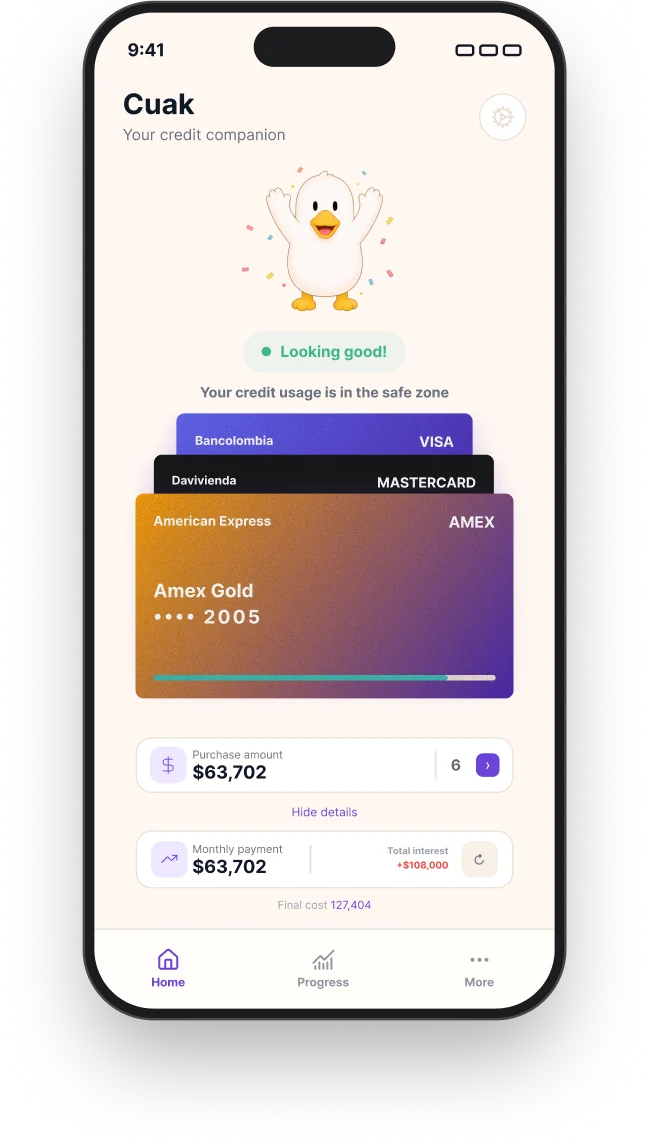
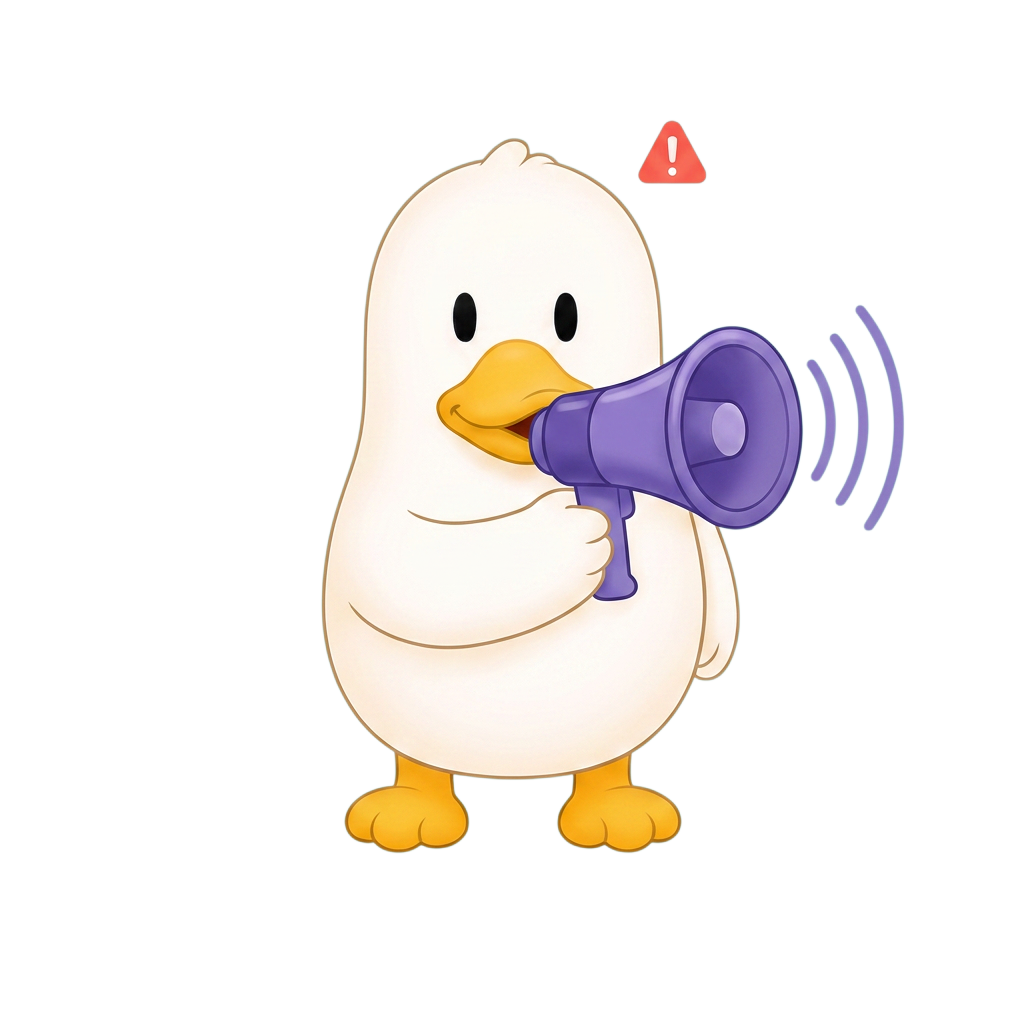
The home screen says Looking good while credit usage is safe. A simulated purchase would end that, so the duck puts the confetti down and picks up a megaphone — before the money moves.
01 Product
02 UI
03 3D
04 Motion
05 Sound
06 Video
Two layers finished, one at concept. The character exists as corrected AI renders rather than geometry, which is exactly why the three below it are still open. The full trace is the rest of this page.
Trace 02DuoGit — the streak breaking
One trace is an anecdote; the same chain run twice is a method. This is the argument the page cannot make yet. The cat already has four states and the widget already has three variants, so layers 01–03 are mostly assembly from pages/duogit.html rather than new work.
Layers 01–03 — the ESA spec, the widget, the four cat states: already exist, need writing up
Layers 04–06 — same dependency as Cuak: no mesh, no motion
Cheapest trace available, and the one that turns the chain from something done once into something done twice.
Trace 03A piece with no product behind it
Both traces above start from a product decision, so both prove the same half of the range. A piece that is only craft — a title sequence, a launch cut, a loop that exists to be watched — proves the other half. It is also the only thing on this site that would back the After Effects and Premiere Pro claims on the resume.
The piece itself — 20–45 s, hosted off the repo
A breakdown: the brief, the board, the cut, what got thrown out
assets/img/lab/breakdown-timeline.webp — 1600 × 900, the post timeline
This trace runs 01, 04, 05 and 06 and skips UI entirely. The chain does not demand all six every time — it demands that none of them be the reason a piece stopped.
Trace 01
Cuak — leaving the safe zone, layer by layer
01 — The state · Product
A state is a trigger, a mechanism and an action
Before anything is drawn, the state has to exist as a rule. ESA — the framework behind both of my case studies — says every state owes three answers: what fires it, what psychological mechanism it uses, and what the person is now invited to do. A state that cannot answer the third one is decoration.
This is the one I am tracing. It matters because of when it fires: it fires on a purchase the user has only simulated, not one they have made. A warning you can still act on is help; the same warning one day later is just a receipt.
The transition
Looking good → Flagging
Trigger
A simulated purchase would take credit usage out of the safe zone — the same zone the home screen is reporting on when it says Looking good.
Mechanism
Loss aversion, used early, and then immediately defused. The cost is made visible while the decision is still open, so the feeling attaches to the choice instead of to the consequence.
Action invited
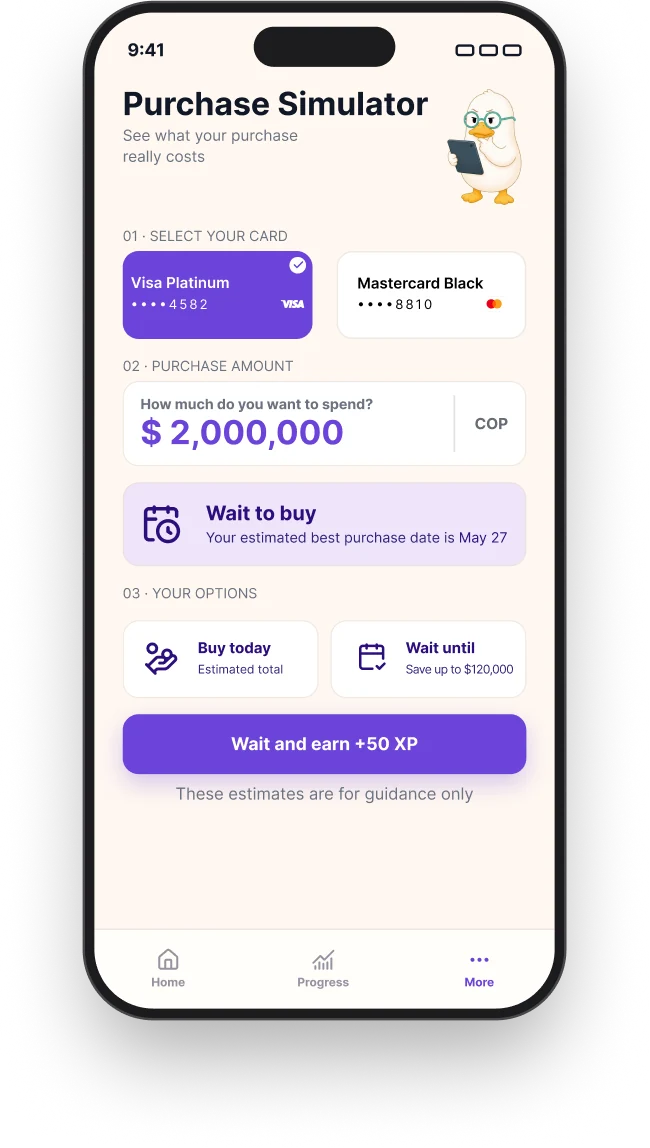
Wait. The product names a better date, puts a figure on what waiting saves, and pays XP for taking it — so the way out is a reward, not a scolding.
Why a character, not a red number
A number that turns red is a report. A character that speaks up is an interruption, and only an interruption arrives in time to change a decision that has not been made yet.
What it must not do
Punish. A character that reads as disappointed in you produces avoidance — the user stops opening the app, which is the one outcome that makes the problem worse. That is why this moment uses the duck's voice and not its sadness.
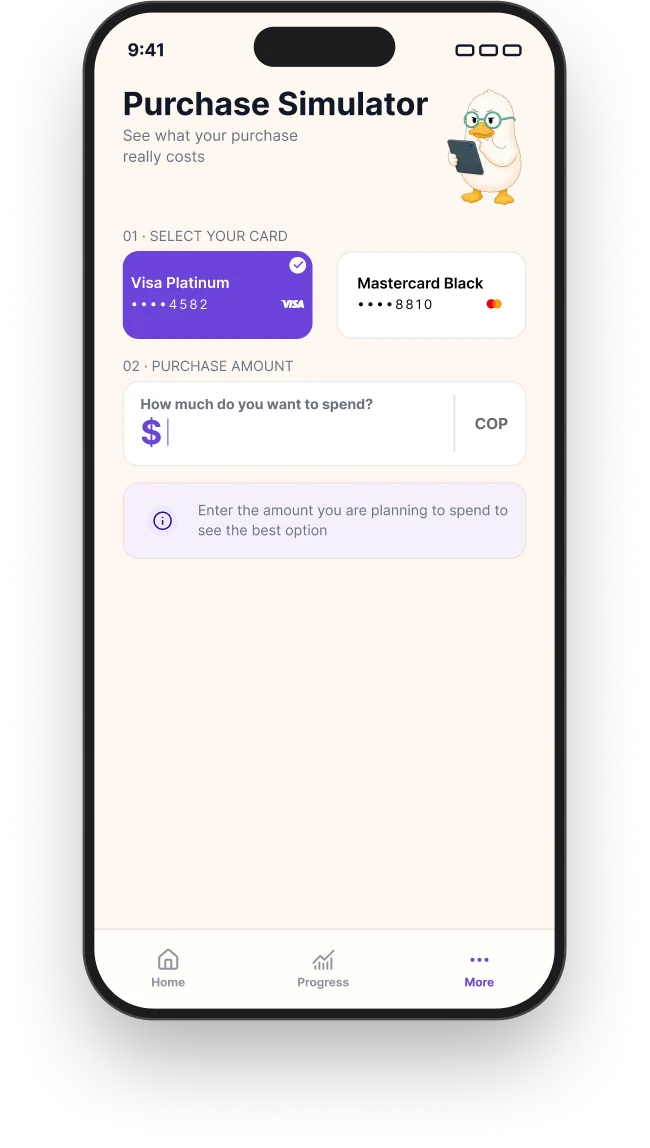
Two screens carry this between them, and they do different jobs. Home is where the state is read: the duck and its verdict come first, the cards and the figures after. The simulator is where the state can be changed — it is the way out, offered before the money moves.
Home, inside the safe zone. The duck answers first, Looking good second, the numbers third. You know where you stand before you have read anything.
That ordering is the whole 60/40 bet: state above data. It also sets the problem this page is tracing — if the duck is what you read first, then the duck is what has to change when the answer changes.
Before. An empty field and one instruction. Nothing is judged until the user has said what they are considering.
After. A better date, a figure on what waiting saves, and XP for taking it. The way out is the primary button.
The state also has to survive being small. On home the duck is a fraction of the size it is here, which sets a hard constraint on the layer below: whatever body this state gets, it has to stay identifiable at 48 pixels.
Layer 02Home screen — out of the safe zone
The missing half of the transition. Home exists in the Looking good state only, so right now this page can show where the change starts but not where it lands on a real screen. Same layout, flagged verdict, the duck swapped for the megaphone state.
assets/img/cuak/screen-home-flagged.webp — 650 × 1148, matching the other seven exports
Worth doing before anything in layers 04–06: it is the cheapest artifact on this list and it is the one the whole page is about.
The hard part of a character system is not getting one pose right. It is getting five that are unmistakably the same animal, each legible at a glance, each tied to a threshold in the data rather than to a mood I happened to like. Same silhouette, same beak, same volume — only the posture and the face carry the state.
Looking good. Arms up, confetti. Usage is inside the safe zone and the duck says so without a number.
Flagging. Confetti gone, megaphone up, alert badge over the shoulder. The duck speaks with you, not at you.
The warning has two volumes, which is a system decision rather than a drawing one. This state carries a purple megaphone; a second state carries a red one with the hand raised, for a threshold that is no longer a suggestion. Two steps mean the loud one still means something — a system with a single alarm teaches people to ignore it.
Keeping a character consistent across states is a spec problem before it is an art problem, so the spec came first. The turnaround below is the reference every state gets checked against: if a pose breaks the silhouette, the pose is wrong — not the reference.
FrontBackArms up
How these were made
These are concept renders, generated with AI, then selected and corrected against the spec above. What that bought was volume, lighting and five usable states in days instead of weeks — which is the only reason the system got playtested at all.
What it cannot buy is geometry. There is no mesh under these images, so there is nothing to interpolate between. That is a real limit, not a cosmetic one, and it is exactly where the next layer starts.
Layer 03Blender model — viewport + wireframe
Upgrades this layer from "concept, corrected" to "modelled, rigged, posed". One mesh, one rig; the five states come from shape keys and pose, not from five separate models.
assets/img/cuak/model-shapekeys.webp — 1600 × 600, the state sliders
04 — The change · Motion
The states are the end points. The design is in between
Two renders tell you where the character starts and where it ends. They say nothing about what the user actually experiences, which is the half second in the middle — and that half second decides the whole bet. The megaphone arriving fast reads as an alarm. The confetti falling first, the arms coming down, and only then the megaphone coming up, reads as someone catching your arm.
This layer also audits the one above it. Motion is a consistency test that stills always pass: put two images on screen in sequence and any drift in the beak, the proportions or the volume becomes the only thing anyone can see.
Layer 04The transition — looking good → flagging
Needs the model from layer 03. Ease out on the weight shift, ease in on the face, so the body moves before the expression does.
Sound is where the state stops being something you watch and becomes something that happened to you. The flagging state needs a cue with no sting in it — closer to a held breath than to an error tone, because the screen is already carrying the bad news and the audio's only job is to mark the moment it landed.
Worth being plain about the medium: browsers block audio from starting on its own, so an ambient loop on a web page is heard by nobody. Sound only pays off where somebody presses play — which is why it is specced here against the clip in layer 06, and not against the loop in layer 04.
Layer 05State cue — the flagging landing
One cue, designed against the transition's timing: the body settles, then the cue marks it. Mixed quiet enough to sit under a voice.
assets/audio/cue-flagging.mp3 — ~0.6 s, mono, −18 LUFS, under 20 KB
assets/audio/cue-clear.mp3 — ~0.4 s, the way back
assets/img/cuak/cue-waveform.webp — 1200 × 300, both cues against the transition's frames
The waveform still is what makes this layer readable with the sound off — which is how most people will read it.
06 — In context · Video
Six layers, eight seconds
The last layer is the only one a stranger will actually watch, and it has to carry the five below it without explaining any of them: a hand types an amount, the number turns, the duck settles back, the cue lands, and a way out is offered. If the chain works, nobody watching it needs this page.
Layer 06The loop in context — with sound
Click to play, with audio and controls. This is the one piece where the sound design is actually heard, so it is the one that justifies layer 05.
cuak-simulator-poster.webp — 1920 × 1080, a frame mid-transition
Host this one off the repo. At 1080p with audio it runs several megabytes, and git keeps every version forever — .git is already 192 MB because of images deleted from the working tree two designs ago.
The same chain, applied end to end
This page takes one state apart. The case studies show what happens when a whole product is built out of them — four-state machines, progression tiers, and fail states designed as part of the loop instead of the end of it.