Own tool · Design systems·2026

Know your design — do the screens agree with the system?

A check I run on Figma files: it reads the design system, goes through every screen in scope and lists where they disagree. Then I had it audited, to see where it breaks.

Run on two concept projects, both mine My role: I set the requirements, asked for the audit, made the decisions and approved the changes Built and audited with AI agents Status: one user, not tested with other designers

So far, neither one passes

Cuak and DuoGit are concept projects of mine. The numbers and rows below come from the saved results of each run.

Cuak

Not passed

24 screens · last run 26 November 2026

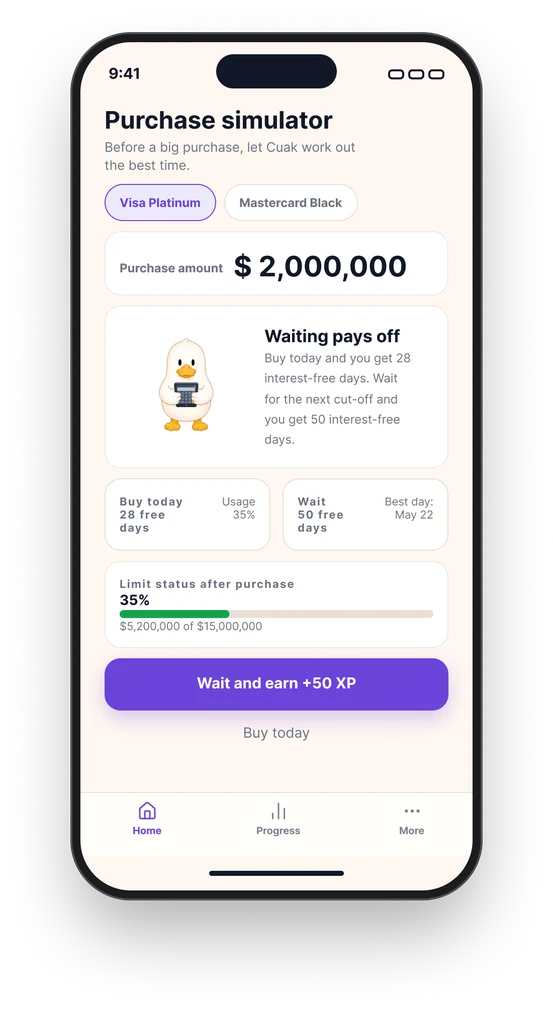
Cuak purchase simulator screen with a card showing the limit status after the purchase, 35 percent
Purchase simulator. “Limit status after purchase” and its “35%” carry colors set by hand.
  1. First run · 10 rules0 errors, 0 warningsWrong: texts with more than one color were skipped.
  2. Tool fixed · 11 rules6 errors, 6 warnings18 of 24 screens clean. The warnings come from the added rule.
  3. Current tool · 11 rules6 errors, 26 warnings12 of 24 screens clean. It now also reports spacing off the scale.
What the last run of Cuak found
ScreenWhat disagreesFindings
Home · Visa PlatinumText “Monthly payment”, colors set by hand #6B7280 #1118272
Home · Mastercard BlackText “Monthly payment”, colors set by hand #6B7280 #1118272
Purchase simulatorText “Limit status after purchase”, colors set by hand #6B7280 #1118272
12 screensGap or padding off the spacing scale (warning)20
6 screensTab bar drawn by hand instead of using the component (warning)6

Open: the 32 findings are not fixed in Figma. Writing down why each exception exists showed that three screens with their own back button were excused from the back rule. Their layers are renamed, and the rule now checks 19 screens instead of 10.

The Cuak system →
DuoGit

Not passed

9 screens · last run 26 November 2026

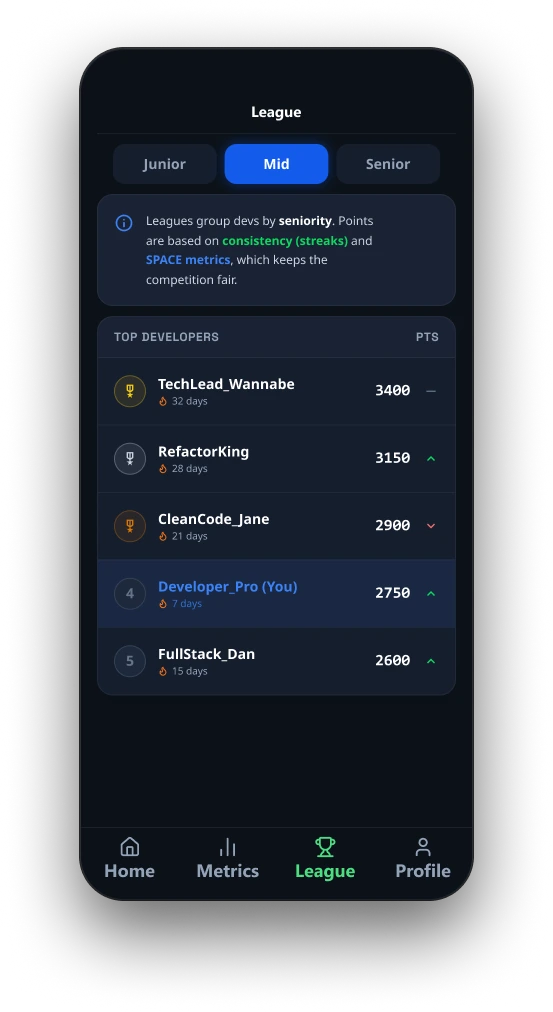
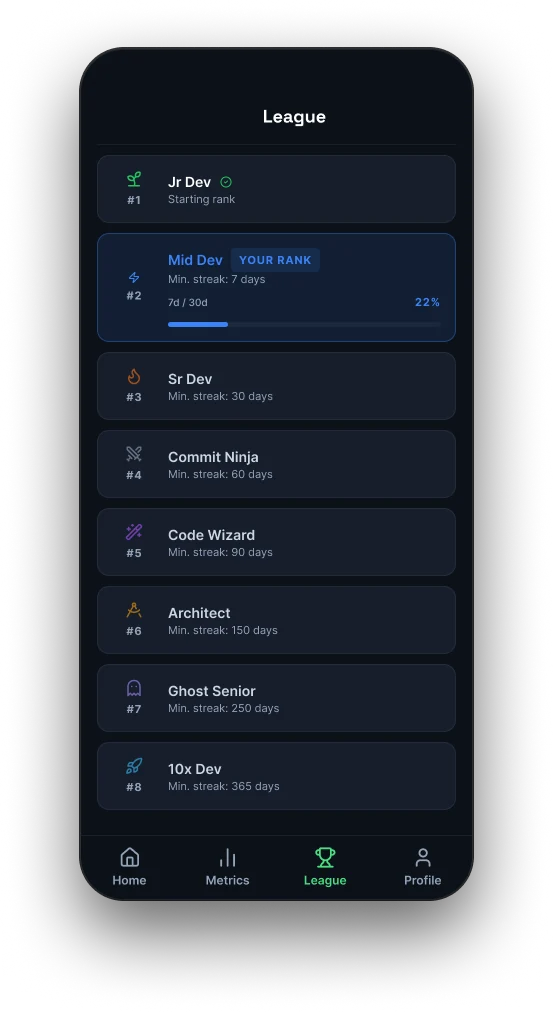
DuoGit league screen listing eight developer ranks, each with a colored icon
League. 17 icon strokes on this screen carry colors set by hand.
  1. Before the system was applied · 7 rules612 errors, 434 warningsThe screens as they were.
  2. After the changes in Figma0 errors, 0 warningsApproved, but icon colors were left out of the check.
  3. Icon colors checked too31 errors, 0 warnings5 of 9 screens clean.
What the last run of DuoGit found
ScreenWhat disagreesFindings
LeagueIcon strokes set by hand #22C55E #F59E0B #38BDF8 #A78BFA17
MetricsIcon strokes set by hand #0A84FF #30D1587
Current streakIcon strokes set by hand #EAB3086
ProfileIcon stroke set by hand #4ADE801

Open: the 31 strokes are not fixed in Figma. Only one has a system color with the same value, so the rest need a design decision.

The DuoGit system →

My report said 0 errors. It was wrong.

Cuak, a concept project of mine, passed its first check. The check skipped any text with more than one color. Once that was fixed, it found colors set by hand in three texts. A clean result had meant “not looked at”.

So the question changed from “does the file pass?” to “can this tool be trusted when it says so?”

Figma is the source

A box is a step that always happens. A diamond is a yes-or-no decision. After a fix, the file goes through the check again. The labels show what the code enforces and what only happens if the flow is followed.

  • Step
  • Decision
  • Code enforces it no pass without it
  • Not enforced depends on following the flow
  • Script reads Figma and checks
  • Agent runs the steps and edits Figma
  • Me the decisions and approvals
  1. Start The Figma file Variables, text styles, a written system and the screens. Me
  2. Run again
    Phase 0 System ready? Script
    No Add what is missing The report does not pass until the system check is ready. Code enforces it ↻ Check again Me
  3. Yes
    Phase 1 · Count Find every screen It also says which ones it left out. Script
  4. Phase 1 Right count? Me
    No Fix the scope Change what counts as a screen. Enforced if a count is set ↻ Find the screens again Agent
  5. Yes
    Phase 2 · Tokens Export the tokens The token file is generated from Figma. The report does not pass until the two match. Code enforces it Script
  6. Phase 3 · Check Check each screen Up to eleven rules, chosen for each project. Script
  7. Phase 4 · Report Write the report What failed and why. A missed screen or a rule that looked at nothing fails the run. Code enforces it Script
  8. Report Passed? Script
    No Fix it A real finding is fixed in Figma, a false alarm in the rule. Nothing checks which is which; the report lists every exception. Errors block, warnings pass AgentMe
  9. Yes
    Review Look at the screens A pass can still miss things. On DuoGit it missed numbers printed over their units and a button in the wrong color. Not enforced AgentMe
  10. Review Approved? Me
    No Fix what looks wrong Then the file goes through the check again. A later change in Figma does not undo an approval. Not enforced AgentMe
  11. Yes
    Approved and recorded On DuoGit: an approval note and a named version in Figma.

A run does not pass just because it found nothing. It also fails when a screen was not checked, when no screen was found, or when a rule had nothing to look at, unless the project accepts that explicitly. Each report says how many items every rule looked at.

Test, break, fix, retest

  1. 1
    Break it on purposeTwo independent AI auditors: one to break the rules against a fake Figma, one to read the project as a stranger. For the first group of fixes, 52 of 61 new tests failed on the old code; all 61 passed after.
  2. 2
    Run it on a real fileThat is where the false “0 errors” showed up.
  3. 3
    Run it on a second projectDuoGit, with only a new config. It exposed seven problems in the tool, all then fixed. Two examples: two screens with the same name were merged into one in the work list, and the generated CSS wrote one font for every text style while the check said “in sync”.
  4. 4
    Act on the reportTrying to act on DuoGit’s report showed that none of the 418 measured colors on its screens was bound to its design system. 256 of them had passed because they were bound to leftovers of an HTML import. After the fix, errors went from 356 to 612 on unchanged screens.

The number got worse because the tool got better.

DuoGit: nine screens, from 612 errors to 0

Same tool, same config, nine screens, seven rules. Icon colors were left out of both runs. DuoGit is a concept project.

RuleTypeBeforeAfter
Colors bound to the systemerror4180
Text uses a system styleerror1920
Text overflowerror20
Spacing boundwarning3160
Radius boundwarning950
Components usedwarning120
Minimum text sizewarning110
Errors6120
Warnings4340

Claude made the changes in Figma. I approved the plan, then a one-screen pilot, then the other eight, and the final screens.

What changed in the system to get there

Two spacing steps, new gold and bronze primitives (plus faint versions for medals), and six medal variables where the plan said three. No rule, exception or scope was changed.

What you can see

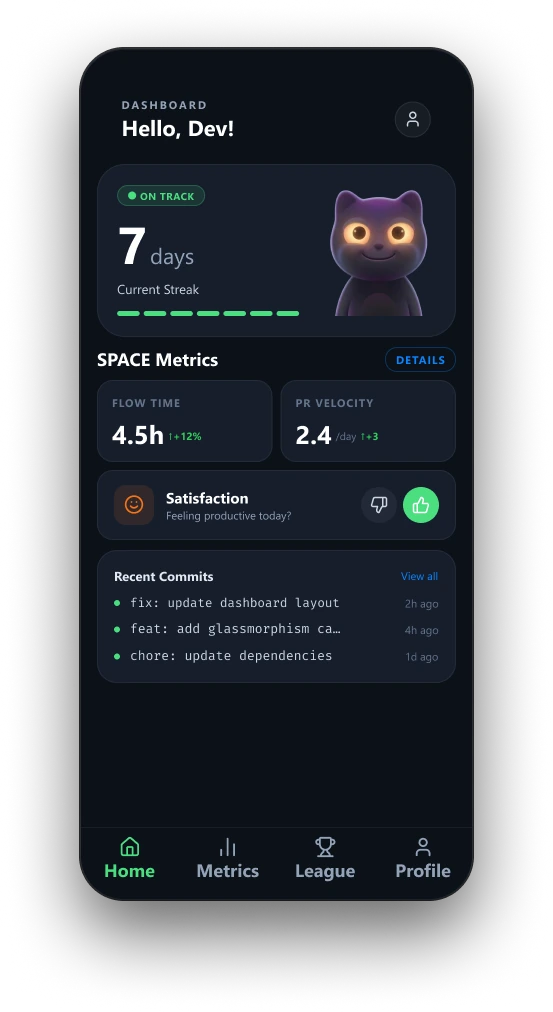
Fonts moved to the system’s, tab labels went from 18 to 12, screen titles are centered, and gray text that failed contrast became the secondary text color.

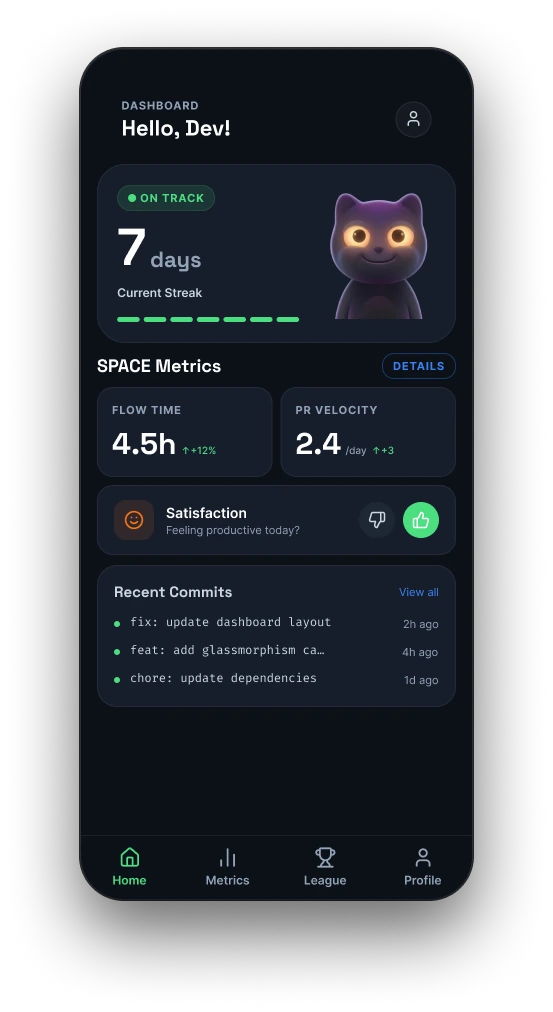
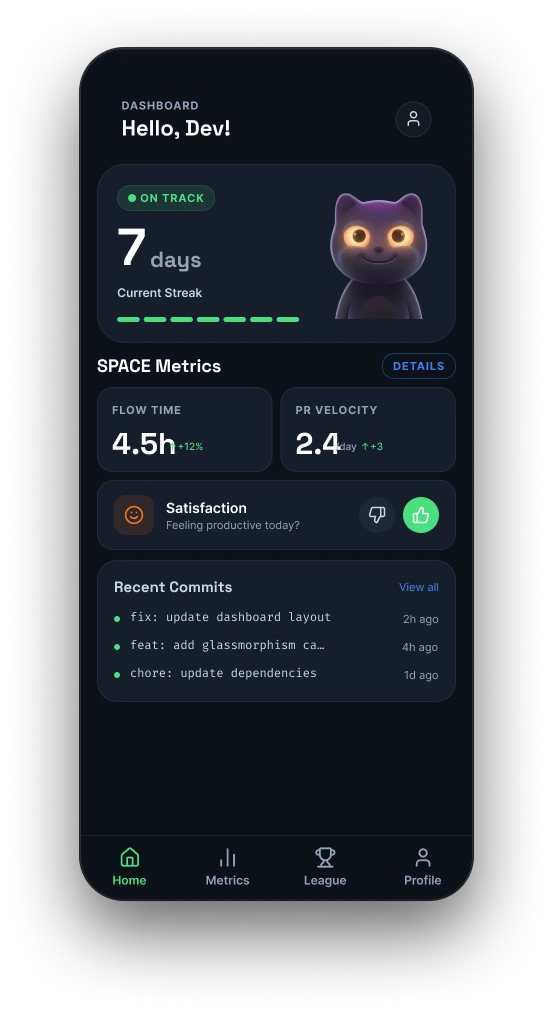
DuoGit dashboard before the design system was applied
Dashboard, before. Fonts and values from an HTML import.
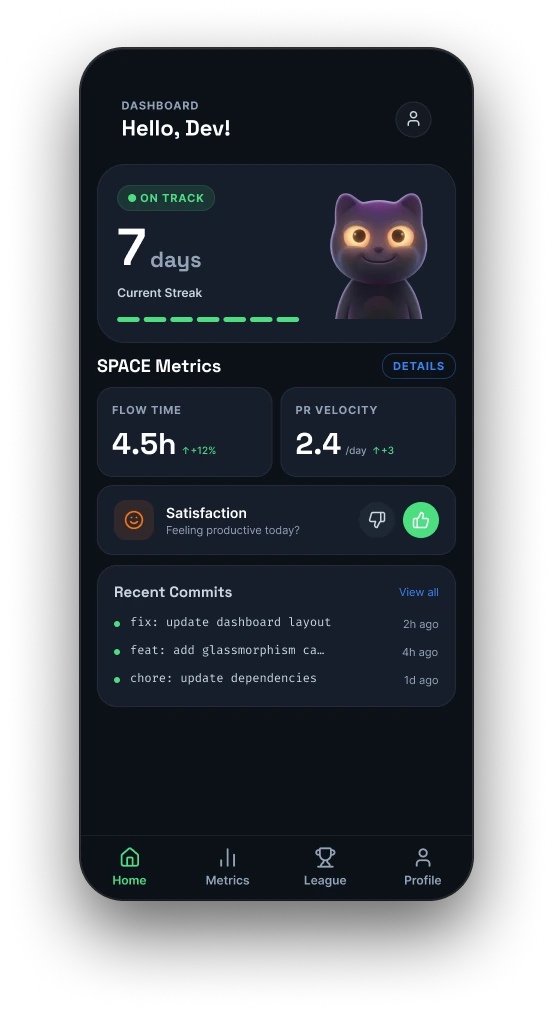
DuoGit dashboard after the design system was applied
Dashboard, after. The system’s fonts, colors and tab bar.
DuoGit league leaderboard before the design system was applied
League, before.
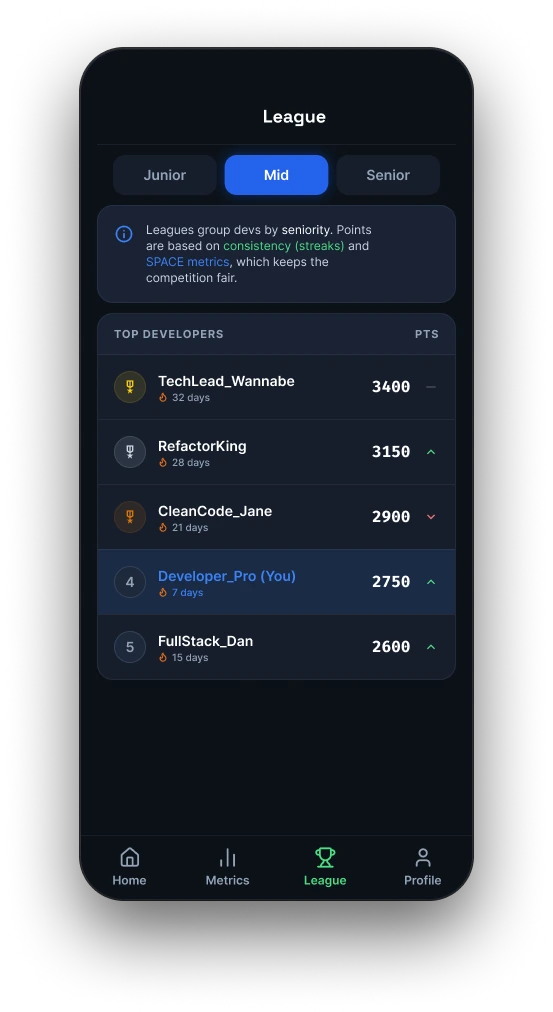
DuoGit league leaderboard after the design system was applied
League, after. System text styles and tab bar.

At 0 and 0, two things were still wrong

Looking at the screens showed numbers printed on top of their units in two Dashboard cards, and the main button of another screen in the information color instead of the action color, a mistake in the mapping plan. Both were found by looking, not by the lint, and then fixed.

DuoGit dashboard with zero lint findings, where the numbers 4.5h and 2.4 overlap their units
0 errors, 0 warnings. And two metric cards you cannot read.
DuoGit dashboard with each number and its unit side by side
Fixed by looking. Number and unit sit side by side.

What I do not know yet

  • That comparison left out 31 icon colors. The tool now checks them, and DuoGit does not pass: 31 errors on four screens, not yet fixed in Figma.
  • 14 shadows are outside what is measured. Gradients and images are not checked.
  • Contrast, visual hierarchy and content were not rules in this run. A 0 does not show good design.
  • Both projects are concepts by me, named in a similar way. I do not know if it works on other files.
  • The report used to say PASSED with the system check blocked or the tokens never checked. It now requires both and lists the exceptions. The cases where one of those two steps is missing or fails were tested on a fake Figma file only.
  • The order of the other steps, whether an exception is justified, the screen review and the approval are still not enforced.
  • Nobody else has run it, nothing was timed, and no other designer or user has seen the screens.
  • What the tool found in Cuak is not fixed in Figma.
  • Known gaps remain: a wrong-sized screen is filtered out before the size rule can report it; shared library styles, ellipses and wrap spacing are not read.
  • DuoGit’s app code does not read these tokens.
  • The tool and the evidence files are not published, so you cannot check these numbers yourself yet.

Working on design systems?

I would rather show where a check fails than say it passes. Let's talk.

Email me →